B_inScope
Video scope and measuring tool for video and audio: waveform, vectorscope, histogram, loudness per EBU R128 (momentary, short-term, integrated, LRA, true peak) and error log – for NDI, capture cards, screen and files.
What B_inScope can do
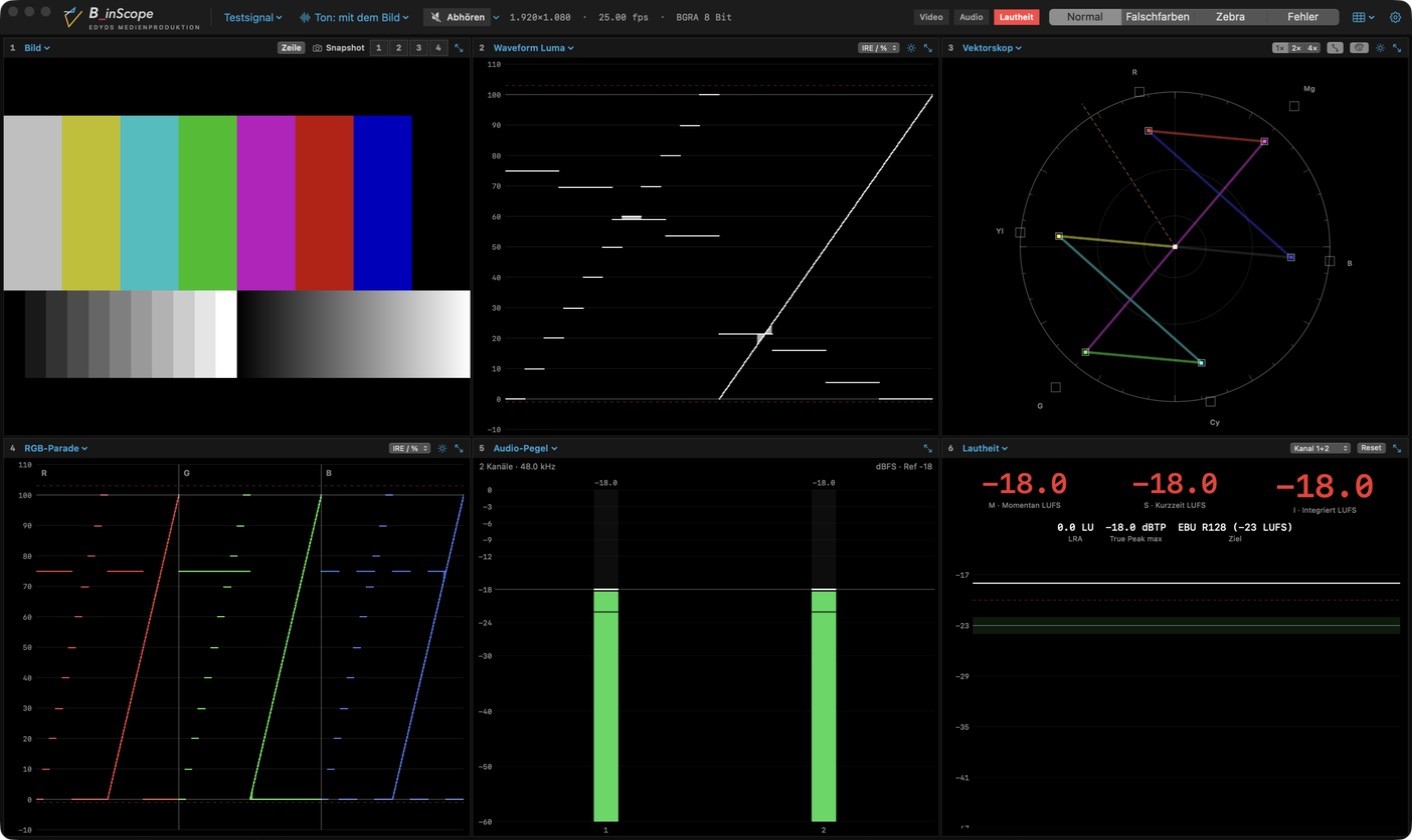
Waveform and parade
Luma and RGB, RGB parade and YCbCr parade – scale in %, 8 bit, 10 bit or mV.
Vectorscope and double diamond
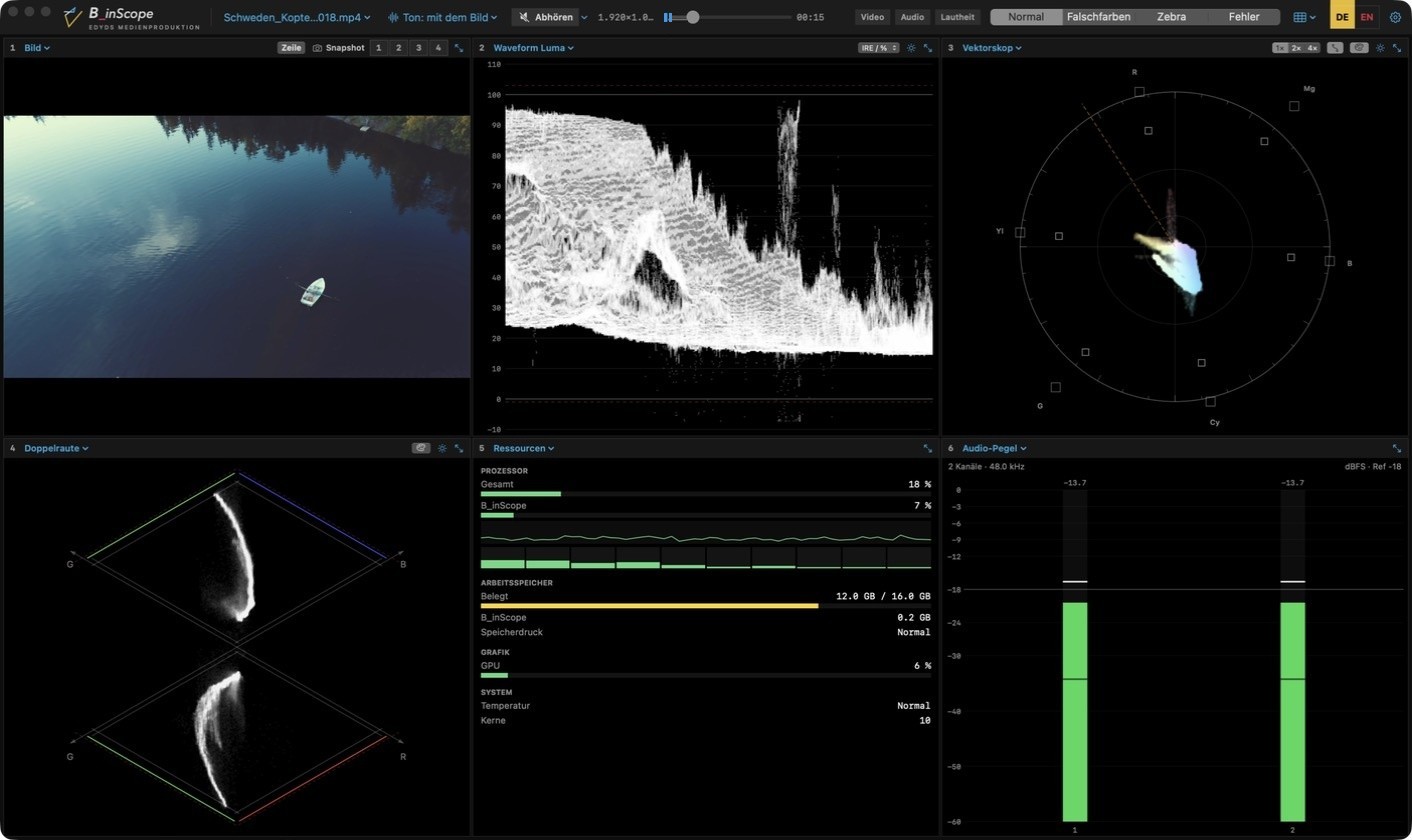
Vectorscope with 75/100 % targets, skin tone line and zoom 1×/2×/4×. The double diamond shows invalid RGB as a trace outside the diamonds.
Histogram, CIE, goniometer
Histogram (RGB + luma), CIE 1931 with Rec.709, P3 and Rec.2020, goniometer with correlation meter.
Loudness per EBU R128
Momentary, short-term, integrated, LRA, true peak and 60-second history per ITU-R BS.1770; audio levels up to 32 channels.
Picture with overlay
False color, zebra and error display. Eyedropper by click, line selection (⌘L) analyses a single picture line.
Error log
Checks for no signal, black picture, frozen picture, luma and gamut errors, silence, overload, too loud and phase errors. Export as CSV, limits adjustable.
Layouts
1, 2, 2×2, 1 large + 3, 3×2 and 3×3 windows. Drag the dividers, sizes are saved per layout.
Monitoring
Chosen channel pair as stereo, mono, left or right on a selectable output device (key M).
Resources
Load of CPU, memory and GPU with history – so you can see whether the computer has enough headroom.
With moving picture
Here B_inScope measures a video file: the picture runs at the top left, next to it waveform and vectorscope show brightness and color live. Below are the double diamond, resources and audio levels.
Sources
Where B_inScope gets picture and sound.
| NDI | Reception without conversion, also 10 bit (P216); audio is measured as well. NDI runtime from NDI Tools required. |
|---|---|
| Devices | Everything the operating system offers as a camera: capture cards and cameras (e.g. from Blackmagic Design or AJA; manufacturer and product names are trademarks of their respective owners), USB capture, webcams. Audio from the audio device of the same name. On the Mac this route only delivers 8 bit. |
| Screen | The whole screen including system sound; the program’s own windows are hidden. |
| File | Images, videos and audio files, endless loop, space bar = pause. |
| Test signal | 75 % color bars, gray steps, ramp, 1 kHz at −18 dBFS. |
Mac and Windows
Same displays and operation on both systems, four snapshots for comparing (Alt-click).
Mac
Capture via AVFoundation (8 bit), screen via ScreenCaptureKit, NDI with 10 bit. Apple Silicon, macOS 14 or later.
Windows 10/11
Installer, portable .exe or ZIP. Waveform, parade, vectorscope, double diamond and CIE are computed by the graphics card (WebGL2); without a usable GPU the program automatically falls back to the CPU. Grant the firewall permission on first NDI use.
Technical data
| Version | 1.2.0 (Mac), 1.2.0 (Windows) |
|---|---|
| Mac | macOS 14 or later, Apple Silicon (arm64) |
| Windows | Windows 10 or 11, 64-bit (x64); not signed (SmartScreen notice on first launch) |
| Audio | up to 32 channels, loudness EBU R128 / ITU-R BS.1770, true peak |
| Video | Waveform, parade, vectorscope, double diamond, histogram, CIE 1931 |
| Check limits | Luma −1…103 %, gamut RGB −5…105 %, adjustable |
| Language | Interface in German and English, switchable |
| Trial | Mac: 14 days, then license key |
Frequently asked questions
Which sources can B_inScope measure?
NDI® streams, capture cards and cameras that macOS offers as a device, the whole screen including system sound, image, video and audio files and built-in test signals.
How do I measure loudness per EBU R128?
The “Loudness” window shows momentary, short-term and integrated loudness, loudness range (LRA) and true peak per ITU-R BS.1770, plus a history of the last 60 seconds.
Which signal errors does the error log detect?
No signal, black picture, frozen picture, luma and gamut outside the limits, missing audio, silence, overload, levels that are too loud and phase errors. You set the limits and export the log as CSV.
What is the double diamond for?
The double diamond shows whether RGB values are valid: green against blue at the top, green against red at the bottom. A trace outside the diamonds means invalid RGB.
In which languages does B_inScope run?
The interface is available in German and English and can be switched in the program.
How long can I try B_inScope, and on how many computers does a license work?
The trial runs for 14 days with the full feature set. One license covers up to 2 computers of the licensee. The check runs offline.
Price & purchase
One-time €79, no subscription.
- Perpetual license for this program, use on up to 2 computers
- Free 14-day trial (Mac, full feature set)
- License key by email, invoice included
For now, purchases are handled by email to bb@edyds.de: you receive an invoice and then your license key. One license covers up to 2 computers of the licensee, which may be used at the same time. Prices are in euros (EUR). If you pay in another currency, the conversion takes place at payment, at the exchange rate of your bank or payment provider. This offer is aimed exclusively at businesses, tradespeople and freelancers (Sec. 14 German Civil Code), not at consumers. For privacy information see the legal notice / privacy policy (available in German).
Download
- B_inScope 1.2.0 trial (Mac)Apple Silicon · macOS 14+ · 14 daysTrialDownload
- B_inScope 1.2.0 for MacApple Silicon · macOS 14+ · full version with license keyFull versionDownload
NDI® is a registered trademark of Vizrt NDI AB. To send and receive NDI, the NDI runtime must be installed on the computer, for example via the free NDI Tools; it is not included. All manufacturer, product and brand names mentioned belong to their respective owners and are used for description only.