B_inTime
Stage timer and countdown for conferences and live events: run of show with start times, messages to the speaker, NDI output with alpha and control by phone or Companion.
What B_inTime can do
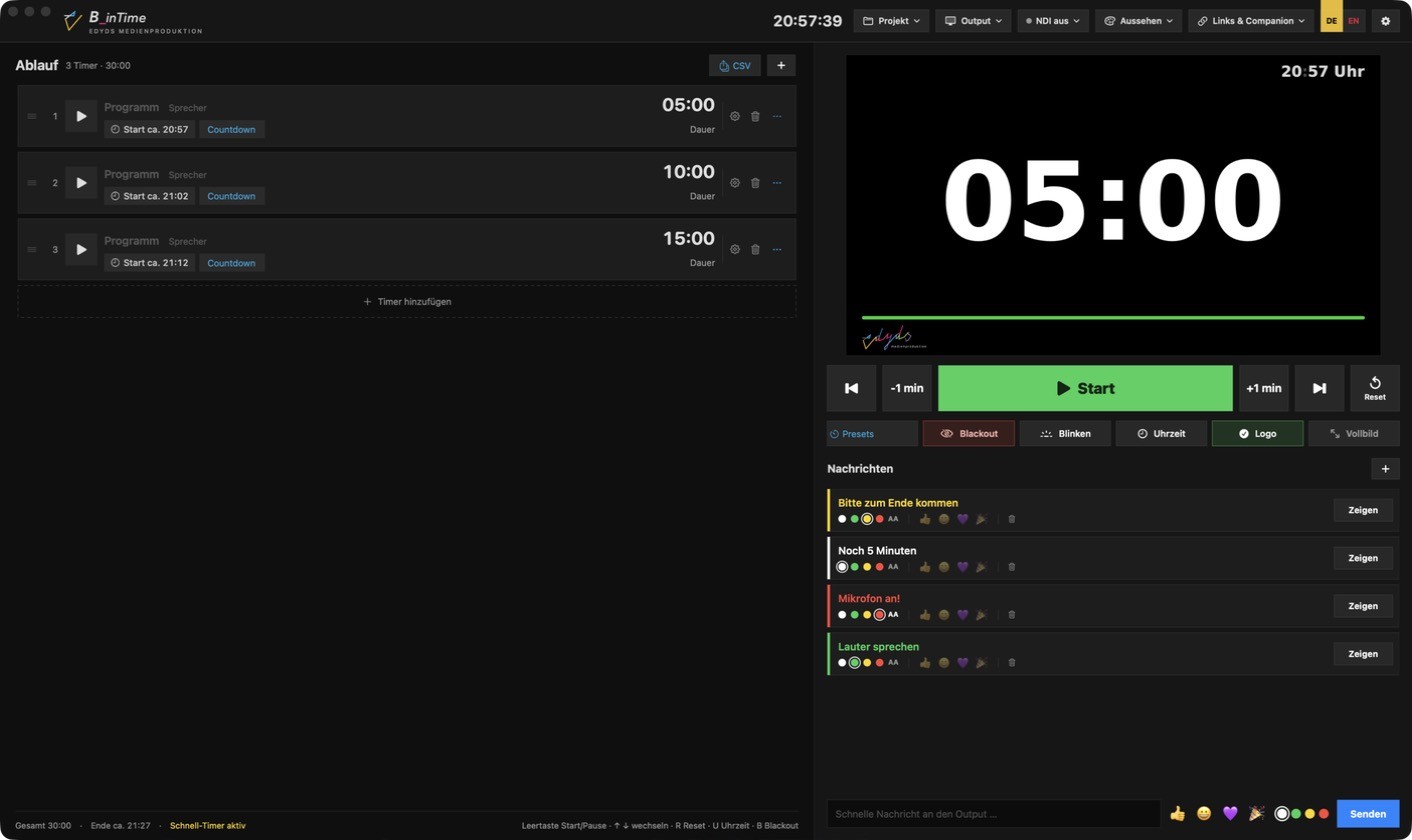
Run of show with start times
Items with title, speaker, duration and mode (countdown, count-up or time of day), sorted by drag & drop. Expected start times for every item and the end of the event.
Three ways to start
Manually, automatically after the previous item (linked) or at a fixed time of day. The next item also starts when zero is skipped with “− time”.
Yellow, red, sounds
Yellow and red thresholds, sounds and a note can be set for every item.
Messages to the stage
In four colors, optionally in capital letters, with emojis (thumbs up, smiley, heart, confetti). You can also send free messages from your phone.
Quick timers
5, 10, 15, 20, 30, 45 and 60 minutes, plus ±1 minute and ±10 seconds. Clicking the running time changes it directly.
Flash and blackout
The stage flashes at the push of a button, blackout turns the output black. Everything also by key: F, B, H, U.
Stage window
Output full screen on any display, with a preview in the control window.
NDI output with alpha
The timer as an NDI® source in 720p, 1080p or 4K, optionally with a transparent background for switchers such as vMix or OBS.
Weather
Temperature and sky of the nearest station of the German Weather Service (open data, updated hourly). Source: Deutscher Wetterdienst.
Remote control by phone, browser and Companion
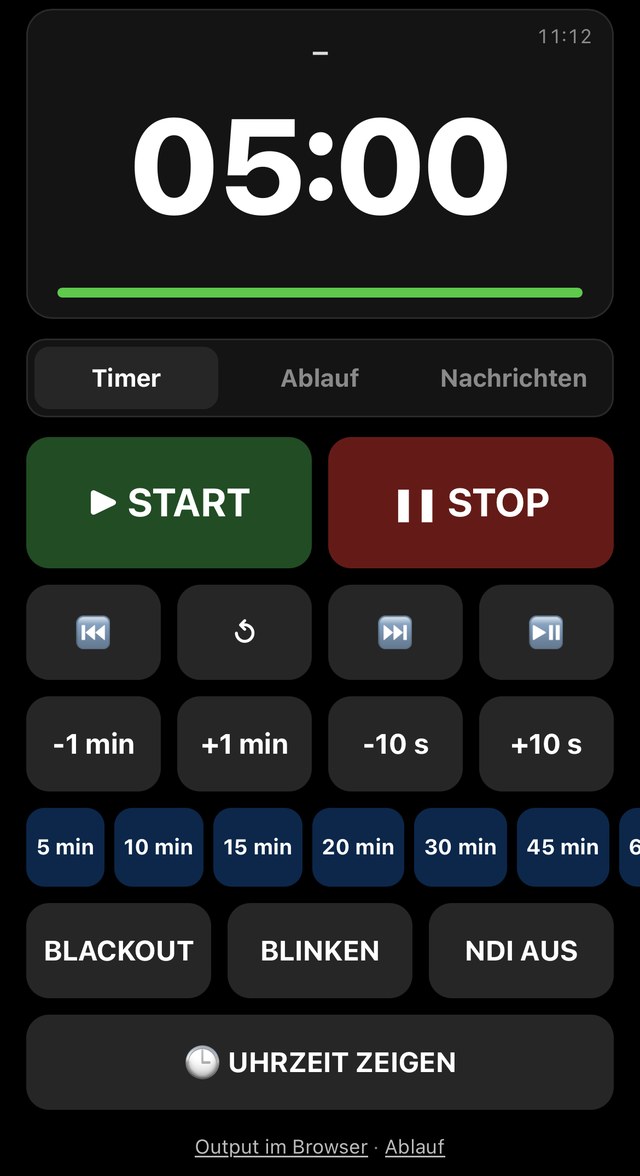
The server runs on port 8099. Open the remote control on your phone in the browser, and the stage view on any tablet or second computer.
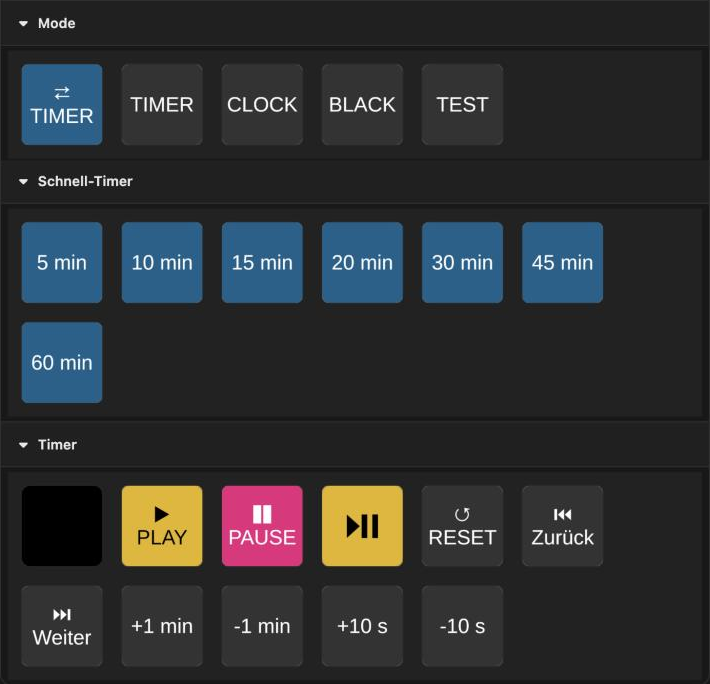
In Bitfocus Companion use the Generic HTTP module or the ready-made B_inTime module. Commands from foreign web pages are rejected; with “Only approved devices” you can restrict control further.
/start  /pause  /toggle  /reset  /next  /prev
/preset/20/start     load and start a quick timer
/cue/3/start         start item 3
/message/1/toggle    show message 1
/message/show?text=Hello&color=red
/clock/toggle        stage: time of day instead of timer
/blackout/toggle  /flash/5
/ndi/on  /ndi/off
/status              status as JSON
Plan, import, back up
For everyday use on the fixed show computer.
CSV import and export
Format title;duration;speaker;note – duration as mm:ss or in minutes.
Saved automatically
Everything is backed up continuously; the last session can be restored. You can also save projects as .bintime files, on Mac and Windows.
Show mode
As long as B_inTime is running, the computer and displays stay awake. When quitting with a running timer the program asks.
Technical data
| Version | 2.3.0 (Mac), 2.3.0 (Windows) |
|---|---|
| Mac | macOS 14 or later, Apple Silicon (arm64) |
| Windows | Windows 10 or 11, 64-bit (x64); not signed (SmartScreen notice on first launch) |
| Output | Output window full screen, NDI 720p/1080p/4K with alpha, 10–60 fps |
| NDI | NDI® runtime required (NDI Tools); loaded dynamically when switched on |
| Network | HTTP server port 8099 · remote control, viewer, agenda · Companion module 1.12.5 |
| Test patterns | SMPTE and EBU color bars, PLUGE, gray steps, luma ramp, multiburst and more (Mac only) |
| Language | Interface in German and English, switchable |
| Trial | Mac: 14 days, then license key |
Frequently asked questions
How do I show a countdown over NDI?
B_inTime sends the timer as an NDI® source in 720p, 1080p or 4K, optionally with a transparent background. In your switcher or software, pick the source “B_inTime”. The NDI runtime from NDI Tools must be installed on the computer.
How do I control the stage timer with Bitfocus Companion?
Import the Companion module “edyds B_inTime” (included in the download package) or use the Generic HTTP module with port 8099. Ready-made buttons for timer, quick timers, mode, messages and output are in Companion under Presets.
Can I control the timer from my phone?
Yes. Open the remote control in a browser at the Mac’s address on port 8099. There you start and stop the timer, choose quick timers and send messages to the speaker. The stage view is available at /viewer for a tablet or a second computer.
How do I send messages to the speaker?
Saved messages are shown with one click. Free messages can be typed on the Mac or on the phone. There are four colors, optionally in capital letters.
In which languages does B_inTime run?
The interface is available in German and English and can be switched in the program.
How long can I try B_inTime, and on how many computers does a license work?
The trial runs for 14 days with the full feature set. One license covers up to 2 computers of the licensee. The check runs offline.
Price & purchase
One-time €49, no subscription.
- Perpetual license for this program, use on up to 2 computers
- Free 14-day trial (Mac, full feature set)
- License key by email, invoice included
For now, purchases are handled by email to bb@edyds.de: you receive an invoice and then your license key. One license covers up to 2 computers of the licensee, which may be used at the same time. Prices are in euros (EUR). If you pay in another currency, the conversion takes place at payment, at the exchange rate of your bank or payment provider. This offer is aimed exclusively at businesses, tradespeople and freelancers (Sec. 14 German Civil Code), not at consumers. For privacy information see the legal notice / privacy policy (available in German).
Download
- B_inTime 2.3.0 trial (Mac)Apple Silicon · macOS 14+ · 14 daysTrialDownload
- B_inTime 2.3.0 for MacApple Silicon · macOS 14+ · full version with license keyFull versionDownload
NDI® is a registered trademark of Vizrt NDI AB. To send and receive NDI, the NDI runtime must be installed on the computer, for example via the free NDI Tools; it is not included. All manufacturer, product and brand names mentioned belong to their respective owners and are used for description only.